XTerm*VT100.Translations:    #override
	Shift<Btn1Down>:		select-start()
	Shift<Btn1Motion>:		select-extend()
	Shift<Btn1Up>:			select-end(CLIPBOARD)
	Shift<Btn2Up>:			insert-selection(CLIPBOARD)
	Shift<Btn3Down>:		start-extend()
	Shift<Btn3Motion>:		select-extend()
	Shift<BtnUp>:			select-end(CLIPBOARD)
Category: Computers
-
Xterm and the clipboard
It has long been an annoyance that xterm doesn’t follow the same rules with regard to the clipboard as most GTK/Gnome applications. Xterm by default only uses the PRIMARY selection for copy and paste, and follows the implicit selection model where the selection is set immediately when text is selected with the mouse, without any further action from the user. Most GTK/Gnome applications uses both an implicit selection model with the PRIMARY selection, and an explicit selection model with the CLIPBOARD selection. I don’t know of any way to get xterm to behave like most other applications, but this little set of X ressources will enable the use of the CLIPBOARD selection in xterm, when the Shift key is down. -
With GNU Emacs you can always learn
It is close to twenty years that I have been using GNU Emacs almost daily, and you still figure out new stuff. I’ve been somewhat annoyed that copying and pasting between Emacs and Gnome applications were so inconsistent, and then its all in the manual:Using the Clipboard As well as the primary and secondary selection types, X supports a “clipboard” selection type which is used by some applications, particularly under OpenWindows and Gnome. The command `M-x menu-bar-enable-clipboard’ makes the `Cut’, `Paste’ and `Copy’ menu items, as well as the keys of the same names, all use the clipboard. You can customize the option `x-select-enable-clipboard’ to make the Emacs yank functions consult the clipboard before the primary selection, and to make the kill functions to store in the clipboard as well as the primary selection. Otherwise they do not access the clipboard at all. Using the clipboard is the default on MS-Windows, unlike most systems.
Maybe its time to read it again. -
irctail – track a file on an irc channel
Irctail is a small program I wrote to keep track of log files on various servers through an IRC channel. It will track stdin or a given file (like tail -f), and send the lines to an IRC channel. There are options to specify irc server, channel, nick and some more. An example:irctail -c channel -n nick irc.example.com /var/log/messages
It is possible to specify a regular expression where a prefix match on the input line will be removed before the line is sent to the irc channel. It can be used to remove timestamps and other stuff that might clutter an irc channel too much. A more real life example. I’m managing a fairly large network with private users, and sometimes somebody installs a wifi network so the dhcp server is exposed on the entire network. This will cause other users problems as they get dhcp responses from the wrong dhcp server. To monitor the situation I run these commands on a network management server:tcpdump -lten -i eth5 udp and src port 67 and dst port 68 and not net 10 >dhcp-servers.out & irctail -c staff -n dhcp irc.example.com dhcp-servers.out &
I could just have piped the output of tcpdump and left out the output file but I’d like to keep it for later reference. Download the irctail source code Full manual below the fold. (more…) -
Labels on ext2 and ext3 filesystems
I just recently discovered that you can put a label on an ext2 or an ext3 filesystem, just like you can with a msdos/fat filesystem. The reason I didn’t know was probably that it didn’t matter, but now with hal and gnome-volume-manager automounting removable disks, the disks in my usb enclosures are mounted as /media/usbdisk, that is, until I changed the label. Then it is mounted as /media/label, which is a lot more useful. The label is set with:e2label /dev/sdc1 yourlabel
Replace the partition with the one you want to set the label on. -
D-Link DI-704P router
I recently bought a D-Link DI-704P router with the intent of using it as a first line of defense in front of a Linux server I have on a public IP. The basic stuff is working as expected, mostly “virtual servers” or “port forwarding” which is used to allow access to the select services I want to expose to the internet. The problem is through-put. I have never seen it do more that about 4 Mbytes/s, and it averages around 3 Mbytes/s, which is a disappointment as I have a line capable of at least 6 Mbytes/s. Maybe I was too stingy getting a cheap boardband router for a high speed line. -
Vmware and tmpfs
With the installation of udev a tmpfs file system is mounted on top of /dev at boot. Device nodes are created automatically by udev as the devices appear, but in the case of vmware it doesn’t work. Vmware needs some device nodes that are created when vmware is configured, so they aren’t there when /dev is taken over by udev. The solution is to created them each time the vmware services are started at system boot. It is done by editing the file /etc/init.d/vmware, adding these lines to the ‘start’ section:for a in `seq 0 9`; do mknod /dev/vmnet$a c 119 $a > /dev/null 2>&1 done mknod /dev/vmmon c 10 165 > /dev/null 2>&1This will recreate the device nodes each time. There’s probably some clever way to automate this with some udev rules, but I still haven’t figured out how. -
Resampling audio data
I’ve never done much with audio data, so when I had to write some audio files to cd, and they weren’t sampled at the right rate, I had a problem. Fortunately, I found sox:sox input.wav -r 44100 output.wav resample
did the job. And I tought it was going to be difficult 🙂 -
Mozilla Thunderbird and the order of accounts
It has long annoyed me that I couldn’t control the order my mail accounts are listed in the left pane in Mozilla Thunderbird. In the end I decided to just edit my ~/.mozilla-thunderbird/default.xxx/prefs.js file to get it right, and after several unsuccessful attempts I found out how easy it is. Open your prefs.js file in an editor and find a line likeuser_pref("mail.accountmanager.accounts", "account1,account2,account3,account4,account5,account6");The number of accounts depend on how many you have created while you have used that profile. Anyway, just reorder the list. You’ll have to find the definition of each account to identify it, but it is not that hard. Too bad there isn’t a GUI user interface for this. -
I love my internet connection
I have my internet connection through a community network called Bryggenet, which serves a part of Copenhagen with internet, cable and telephony services. The connection is a shared 62Mbit/s line, brought to my house through a 100Mbit/s network 25 september 2004, 09:50$ apt-get update Fetched 9470kB in 3s (2420kB/s) $ apt-get dist-upgrade Need to get 95.8MB of archives. Fetched 95.8MB in 17s (5453kB/s)
Ups, I forgot to mention the price of this connection: $25/month, flat fee. 10 oktober 2004, 18:00$ apt-get update Fetched 9491kB in 3s (2499kB/s) $ apt-get dist-upgrade Need to get 62.4MB of archives. Fetched 62.4MB in 13s (4625kB/s)
-
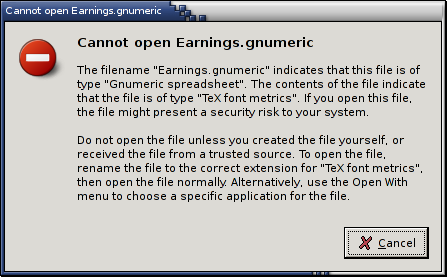
Nautilus: where do you want to go today?
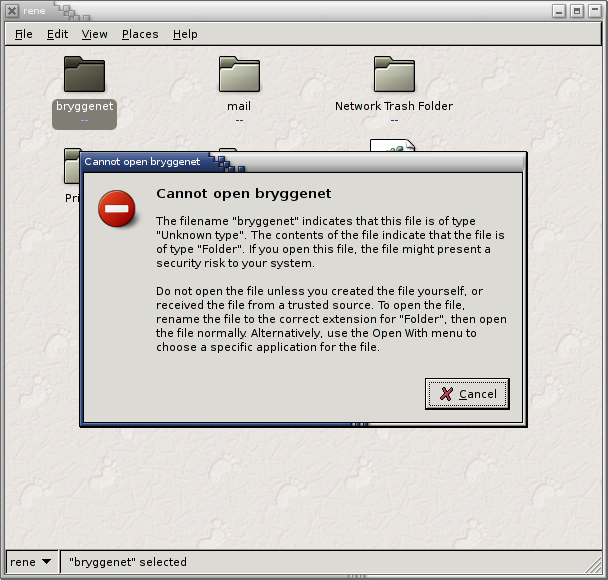 The new spatial nautilus is generally nice, but sometimes the mime type detection messes up.
This time I had an sftp: location open, where I have a symlink to another folder on the remote server. First the symlink is shown as a file of an unknown type, but when I double click on it to open the folder, I get an error message that, to say the least, is not very helpful.
What is exactly the correct extension for “Folder” and if I open the “Open with” menu, there nothing there.
What am I supposed to do?
Is there really no way I open the remote folder?
UPDATE: the bug report is here, so I’m not alone.
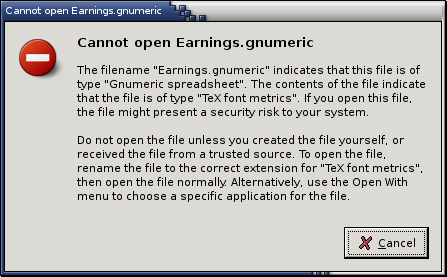 UPDATE 2: I have another file, a Gnumeric file, which is regularly, but not always, recognised as a “TeX font metrics” file. I have no idea why, but it must be some pattern of bytes in its content that triggers this faulty identification. At least in this case I can open it via the “Open with” menu.
-
OpenOffice.org won’t print with CUPS anymore
For some reason oowriter has decided it doesn’t want to print with CUPS anymore. I had set up CUPS_SERVER to point to my home server, so I wouldn’t need to maintain a print setup on our laptops, and every other application prints nicely, but OOo. In the print dialog the two CUPS printers are there, as expected, and when I print something, the progress dialog flashes briefly on the screen saying the job is being sent. On the print server nothing ever arrives. There isn’t the slightest trace of any incoming print job. The CUPS interface in Openoffice appears to be a Debian addition, so I have reported the bug there. Currently, my workaround involves adding the lineunset CUPS_SERVER
to the start of/usr/lib/openoffice/program/sofficeand not having a local CUPS server running. If the environment variableCUPS_SERVERis set, OpenOffice will use that, otherwise if there is a CUPS server on the local computer, that will be used. By removing both options from OpenOffice, it will fall back to a generic PostScript printer interface. The only thing I have done there is to useoopadminto set the correct command to send the job to my preferred printer. I tried setting CUPS_SERVER to point to a non-existant host, but that caused OOo to hang during startup. With the above workaround (I’m a bit loathe to call it a solution to the problem) I can print to my preferred printer, but I do not get any of the printer specific options, such as resolution, paper type or size, or whatever else the printer PPD might define. -
GNU Emacs and UTF-8 locale
I recently wanted to shift to a UTF-8 locale, because I wanted to play with stuff like writing in Arabic, and because it seems to be the road forward. So I switched and GNU Emacs starts to enter garbage in my buffers. I type “æøåÆØÅ éÀ“, but Emacs gives me “æøåÃÃà éÃÂ⬓. Ever so slightly less useful, and less readable too. I tried fiddling with “Options | Mule | Language Environments” and “Options | Mule | Set Coding System”, but to no avail. Somewhat deluded I gave up and went back to Latin 1, mostly at least. Every once in a while I tried again, and one day I stumbled over a reference to the Emacs fileetc/PROBLEMS, a section on problems with UTF-8 support in GNU Emacs. Unfortunately the section was gone from my copy, but I found it on the net. The solution to all my problems: add the following lines to~/.emacs:(setq locale-coding-system 'utf-8) (set-terminal-coding-system 'utf-8) (set-keyboard-coding-system 'utf-8) (set-selection-coding-system 'utf-8) (prefer-coding-system 'utf-8)
The problem went away and haven’t been seen since. BTW, I’m using GNU Emacs 21.3.1, installed from Debian testing and unstable (tried them both).